


Upside: Gas & Food Cash Back
4.6187.88K Reviews
App Specs
- Version
- 26.29.0
- Updated On
- License
- Free
- Downloads
- 10,000,000+
- Developer
- Upside Inc.
- Categories
- Travel & Local
- Platform
- Android, iOS
Screenshots
 Analysis by AppCompare
I find the best way to judge a cashback app is to ask whether it fits into errands I already make, rather than whether it can tempt me into spending more. Upside: Cash Back - Gas & Food is built around that practical idea: check for a nearby offer before a purchase, follow its steps, and see whether the extra saving feels worth the small bit of planning. It is a free travel and local app from Upside Inc., and I see it as a useful sidekick for routine fuel, food, and shopping stops—not a replacement for budgeting or a reason to take a detour.
A routine that keeps the effort small
My sensible starting point is to open the app before I have already pulled into a station or placed a restaurant order. I can look at nearby offers, compare them with places I would genuinely use, and claim the one that suits the trip. Then I make the purchase using the required method and keep an eye on the app for the result. That sequence matters: checking first makes it easier to avoid choosing a less convenient stop just because an offer caught my eye.
A realistic example is a weekday commute. If I already need fuel, I can check the options near my route while planning the stop, rather than driving across town for a slightly better-looking deal. If I am also picking up lunch, I can check whether a nearby food offer fits a meal I was going to buy anyway. The win is not only the cashback; it is that the app can make an ordinary expense a little more rewarding without turning the errand into a special trip.
Small checks that prevent avoidable disappointment
I would make a habit of reading each offer’s instructions before claiming it. The general flow is straightforward, but the details of an individual offer determine what purchase qualifies and how to complete it. A quick check at the start is less frustrating than assuming every location or payment method works the same way. I also keep the receipt until the purchase has appeared as expected, especially while learning how a particular kind of offer behaves.
Location access is useful because nearby offers are the point of the app, but I treat it as a practical setting rather than something to leave unquestioned. If I am browsing from home, I can decide whether I need location enabled at that moment; when I am comparing stops on the road, access can make the search more useful. I also check that the payment card I intend to use is the one linked in the app, since a mismatch between the claimed offer and the way I pay can undermine an otherwise simple routine.
Repeatable habits beat chasing every offer
For frequent drivers, the easiest pattern is to check before regular refuelling and compare offers along a route they already travel. I would not treat the biggest displayed reward as an automatic winner: distance, convenience, and the amount I planned to buy still matter. A smaller saving at a familiar stop can be a better choice than adding miles or time to reach another location. That is a useful discipline with any deal app, but it matters especially when the purchase is something you make often.
For meals and grocery errands, I find it helpful to think in terms of existing plans. If I am deciding where to eat anyway, an offer can be a tiebreaker between places I would be happy with. If I am not hungry or do not need groceries, a reward is not a good reason to spend. The app works best when the offer follows the errand, not when the errand is invented to follow the offer.
Worth Reading Before You Choose

EA SPORTS FC Mobile 26 Is a Bigger Football Game, but It Takes Time

Flipboard Shows What News Apps Must Do Beyond the Feed

Switching to Android Auto Means Rethinking Your Driving Routine

Google Calendar Makes a Crowded Week Easier to Manage

Ludo King Makes the Most of the Minutes Between Plans

Baby Panda World Brings Quick Play to Modern Phones, but Its Game Library Feels Busy
Simplifying Savings
Alright, let’s talk about how Upside works. The app is super simple to navigate. Once you’ve got it installed, you’re just a few taps away from earning some cash back. You know that feeling when you find a couple of bucks in your jeans pocket? Yeah, it’s kind of like that, but with less lint.
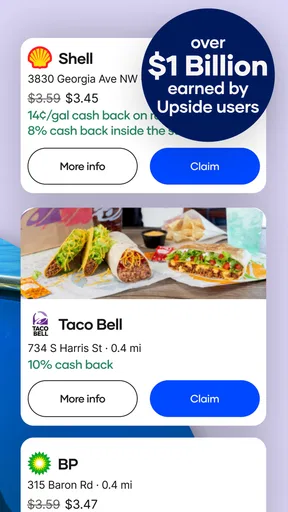
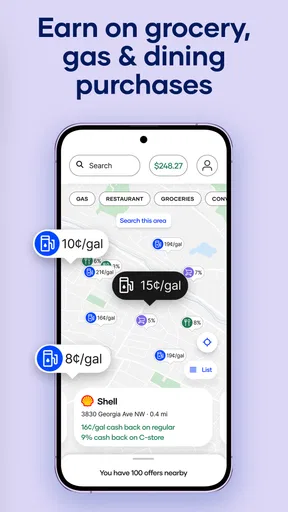
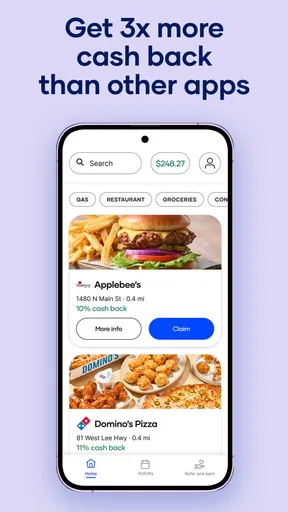
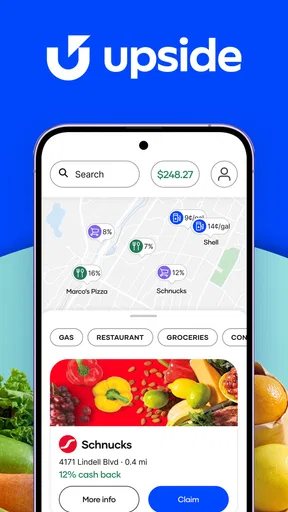
The app uses your location to show nearby offers. You’ll see deals on gas stations and restaurants around you. Claim an offer, make the purchase with your linked card, and boom! Money back in your pocket. It’s like having a little treasure map, but for discounts. And who doesn’t love a good treasure hunt?
Making the app work for your habits
One useful way to make that simple flow more dependable is to choose a repeatable moment for checking offers: before leaving for fuel, while planning lunch, or before starting a grocery run. That small shortcut avoids relying on memory at the counter. I also prefer comparing only a few realistic choices rather than scanning every nearby listing; a long browse can cost more attention than the saving is worth. If I’m driving, I make the decision before setting off, not while moving.
The app is listed at a 4.5 average from around 425,000 ratings, with more than 10 million installs. Those figures suggest that many people have tried it, but they do not tell me whether it will suit a particular routine. The practical question is whether its offers line up with places you already visit and whether you are comfortable following the claim-and-pay steps consistently.
Where the trade-offs show up
Cashback is not always as immediate or effortless as paying with a general rewards card. You may need to check and claim an offer before the purchase, use the qualifying payment approach, and later confirm that the reward has tracked. That extra sequence is the main trade-off I would weigh against a card that earns rewards automatically. A card may be simpler for someone who wants one payment habit everywhere; the app can be more appealing to someone willing to check local offers for a chance at an additional return.
I would also avoid treating an offer as proof that a location is the best-value choice overall. Prices, menus, and convenience still matter, and an attractive reward can be outweighed by a longer drive or a purchase I did not need. If I cannot find a suitable offer near my usual route, I simply carry on with the errand. That keeps the app in its proper role: a possible extra on spending I had already planned.
Who is likely to get the most from it?
Drivers who buy fuel regularly, people who already compare local places to eat, and shoppers whose errands take them past participating locations are the most natural fit. The app may also suit anyone who enjoys keeping an eye on small savings over time. It is less compelling for someone who rarely buys the categories it covers, dislikes checking terms before paying, or expects every purchase to earn something without any preparation. For that person, a straightforward card reward or no added rewards routine may be less hassle.
There is also a useful distinction between “free to install” and “free of effort.” Upside costs nothing to download, but your attention is still part of the transaction: you check, claim, pay correctly, and verify. I would try it on a normal planned purchase first, then decide whether that routine feels natural. That low-pressure test is more informative than changing all your shopping habits at once.
What to expect from the app over time
The app is rated for Everyone, and its current version is 10.71.0, with a minimum operating-system requirement of version 9. It was released on April 24, 2016. I mention these details because they help set expectations about compatibility and maturity, while the day-to-day value still depends on nearby offers and your own habits. Its Travel & Local focus makes sense for checking options around a trip, even though the spending itself may be for fuel, food, or groceries.
For tracking, I like the idea of reviewing accumulated savings occasionally rather than checking the balance after every small purchase. That keeps the reward in perspective and helps answer a useful question: is the app returning enough value for the attention I give it? If I notice that I repeatedly forget to claim offers or rarely find one that fits, I would simplify my routine or stop using it rather than forcing the habit.
Boosting Your Budget
What’s really cool about this app is how it helps you boost your budget. Whether you’re commuting to work or just heading out for a meal, those small savings add up pretty quickly. Trust me, I was skeptical at first, but seeing those little cashbacks roll in felt pretty rewarding.
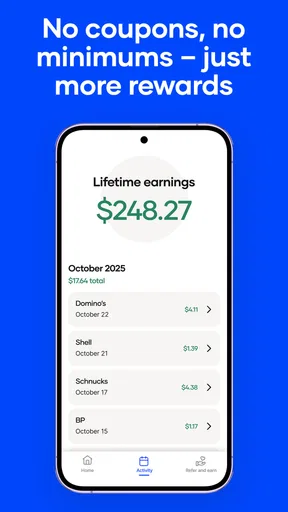
Plus, the app’s got a nice little feature where you can track your savings. Over time, you can actually see how much you’ve pocketed. It’s like having a piggy bank that fills up without you even realizing it.
Everyday Convenience
We all love convenience, right? The app doesn’t just stop at gas and food. It’s also got deals at grocery stores and more. The range of offers make it super handy for everyday errands. I found myself using it more than I initially thought I would, especially when I realized just how easy it was to integrate into my routine.
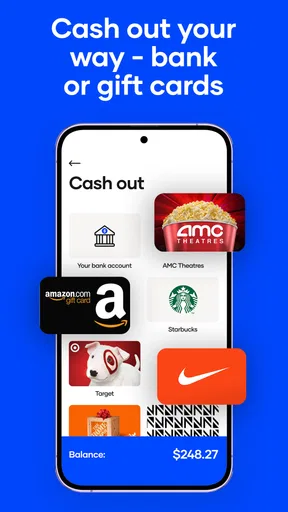
The cherry on top? You can cash out your earnings via PayPal, e-gift cards, or even directly to your bank account. It’s pretty flexible, so you can choose whatever works best for you.
Final Thoughts
So, would I recommend Upside: Cash Back - Gas & Food? Absolutely. It’s not going to make you a millionaire overnight, but it certainly adds a little cushion to your wallet. For those of us who enjoy being savvy with our spending, this app is a gem. Just remember, the key is to use it consistently to really see those benefits add up.
Give it a whirl next time you’re out and about, and see how it feels to get a little something back for your everyday expenses. Happy saving!
Pros
- Easy to use with a user-friendly interface.
- Offers cash back on everyday purchases.
- Wide range of participating locations.
- Quick and reliable payment processing.
- No hidden fees or subscription costs.
Cons
- Limited to certain geographic areas.
- Cash back rates can vary by location.
- Requires location access for best use.
- Not all purchases qualify for offers.
- Occasional app glitches and bugs.
FAQs for Upside: Gas & Food Cash Back
What is Upside: Cash Back - Gas & Food?
Upside: Cash Back - Gas & Food is a mobile application designed to help users earn cash back on everyday purchases, especially from gas stations, restaurants, and grocery stores. By using the app, users can find participating locations, make purchases, and claim their cash back rewards seamlessly.
How does the cash back process work with Upside?
To earn cash back with Upside, users need to open the app, find participating locations, and claim an offer before making a purchase. After the transaction, users upload a receipt, and the app will verify the purchase. Once verified, cash back rewards are added to the user’s account, ready to be cashed out.
Is Upside free to use?
Yes, Upside is completely free to download and use. There are no subscription fees or hidden charges. Users can start earning cash back by simply downloading the app, signing up, and using it at participating businesses. The app generates revenue by partnering with merchants who offer cash back incentives.
How secure is my personal information with Upside?
Upside takes user privacy and data security seriously. The app uses encryption to protect personal information and does not sell user data to third parties. Users are required to upload receipts and link payment methods, but these processes are designed to ensure security while enabling cash back rewards.
What types of purchases are eligible for cash back with Upside?
Upside offers cash back on a variety of everyday purchases. The primary categories include gas stations, restaurants, and grocery stores. However, specific offers and participating merchants may vary by location. Users should check the app regularly to find new offers and ensure their purchases qualify for cash back.


